

My Blocker Playbook
Over the years, I've had to help many teams address frequent blocks in flow - this is now my go-to guidance

A HUGE part of this playbook was informed and inspired by collaboration with the great Paul Brown on our last client engagement, where he opened my eyes to the power of Pro Kanban.
This uses Jira as an assumed environment for work tracking, but should apply to any work management system.
Definition of a Blocker
A clear policy must define what constitutes a blocker versus an “impediment.”
Internal Impediment: Something the team can resolve themselves (e.g., waiting for a teammate to finish a review - this can be addressed within the team).
External Blocker: A true blocker is usually an external dependency (e.g., waiting for a third-party API, legal approval, or a hardware delivery).
Is it a block?: If the team cannot progress the item through their own actions, the item is officially blocked.
That being said, my rule of thumb is that any condition that stalls progress for more than 2 hours should be recorded: via right-click `Flag with comment` on the Kanban board. It may just be friction or some impediment, but without the record, we will likely struggle to understand trends and patterns over time.
Impact on Flow and Measurement
Kanban focuses heavily on Cycle Time and Work Item Age. A blocker policy should dictate how these are handled:
The Clock Never Stops: We do not stop the clock on Cycle Time just because an item is blocked.
Why? Because the customer doesn’t care why it’s late; they only care when it’s delivered. Stopping the clock provides a false sense of efficiency, destroys observability, and erodes trust.
Blocker Age: Teams are encouraged to monitor “Blocker Age” as a leading indicator. If an item is blocked for longer than your 50th percentile cycle time, it needs immediate escalation.
Why can’t we use a swimlane or column to track blocks?
With a blocked column you lose a lot of critical information that helps you act effectively on not just individual blocks but block patterns and the overall work in progress.
If you care about flow metrics and diagnostics then a blocked column makes your work harder and less precise. It matters where work is blocked - and for how long - if you want to effectively address the causes of blocks. If you move it the moment you hit a blocker, you lose the data around cumulative impact (e.g. “we hit a block in review with 70% of tickets and it typically costs 3 days, which stretches out the cycle time of review”). Moving the item into another column also obscured the context of where the item came from (unless you dig for it). Where should it go back to when it gets unblocked?
With a blocked column you lose all of that information unless you do some complicated, unnecessary data querying to stitch it all together. Jira and other work management tools provide specific mechanisms (e.g. ‘flag’ and ‘flag with comment’) that allow you to record blocks without sabotaging your flow data or board rules for making efficient progress.
As an advisor, I care about how long items stay blocked. I care MORE about where the blocks are happening, and the impact of those blocks on the relevant stage. A block in planning is much cheaper than a block once we’ve spent weeks building a solution.
One of the easiest rules to maintain flow is to mandate that items should never go backwards on a board. It ensures progress is steady and the team can clearly understand progress at a glance. With a blocked column, your work items are potentially moving to and from your blocked column multiple times, and progress is impossible to understand without additional commentary. With a flag, I can see exactly where the item is blocked, and progress is preserved. In a tool like Jira, I also get a visual indicator on the blocked item, and I preserve my column WIP. It’s too easy to park a blocked item in a blocked column, then start a new task and preserve my WIP limit. My WIP hasn’t gone down, but I have a new task to pay attention to, and my block is easily forgotten.
Flag vs Label
Your other option is to either use flagging or a label, where flagging is a built-in capability that has a few advantages:

Blocker Clustering (Data Analysis Strategy)
Every time a blocker is identified or resolved, you shouldn’t just move on—you should capture the data. This is called Blocker Clustering.
Track the “Why”: Categorize the reason for the block (e.g., “Vendor Delay,” “Missing Specs,” “Environment Down”).
Track the “Duration”: Record how many days the item remained blocked.
The Analysis: Periodically group these “clusters.” If 80% of your delays come from “Legal Review,” you have empirical evidence that the Legal process is your system’s primary constraint.
Blocker Policy
Explicit Escalation Paths
A policy is useless if it doesn’t tell the team what to do when a flag goes up. A policy typically includes:
Level 1: Team attempts to resolve within 24 hours.
Level 2: Scrum Master/Flow Manager/Outcome owner intervenes with outside stakeholders.
Level 3: Leadership is notified of the specific “Cost of Delay” associated with the blocked item.
Blocker Tracking:
Track blocker data to identify common causes. Most blockers are common causes that should be systematically addressed.
Antipatterns - what to avoid:
Lack of Clarity on What Counts as “Blocked”
Data Pollution: If one developer flags a 10-minute coffee break and another ignores a 2-day dependency, your “Blocked Time” metrics are meaningless noise.
Hidden “Tinkering”: Without a clear definition, we often “tinker” or “gold-plate” a task while waiting for info instead of flagging it. This is waste disguised as productivity.
Swarming Paralysis: The team doesn’t know when to jump in. In a healthy Kanban system, a “Blocked” flag is a flare for the team to swarm and help. If “blocked” is vague, the team stays in their silos.
WIP Limit Friction: It leads to arguments over whether a card should still count toward a person’s limit. This friction slows down the actual work.
No Escalation Path for Extended Blockers
A “Blocker Graveyard”: Without a timer (e.g., “If blocked for >24 hours, notify the Lead”), work could sit for weeks. By the time they are unblocked, the context is lost and the code usually requires massive rework.
Learned Helplessness: If developers feel like their hands are tied and no one in leadership is helping, they stop caring. It destroys the “Stop the Line” culture essential to Lean.
External Priority Blindness: External teams or contributors won’t prioritize your needs if there isn’t a formal “nudge” from a manager or stakeholder. Without escalation, you are always at the bottom of their pile.
Predictability Collapse: Long-term blockers create “outliers” in your data. This makes your delivery dates look like a guessing game rather than a science, which ruins stakeholder trust.
Blocks only raised in standup:
Massive Time Leakage: Waiting until the next morning to report a blocker means a task could sit idle for up to 23 hours. That is pure waste (Muda) in your Lead Time.
Status Report Syndrome: It turns the standup into a “confessional” rather than a tactical sync. Standups should be for discussing the fix, not discovering the problem.
Passive Culture: It encourages a “not my problem until tomorrow” mindset, where developers stop taking initiative to clear their own path the moment they hit a snag.
Not measuring blocks:
The “Invisible Waste” Problem: You can’t manage what you don’t measure. Without “Blocked Time” data, you have no objective way to prove why a sprint or cycle failed.
Unfair Performance Metrics: If you don’t track blocks, the team just looks “slow.” Their Cycle Time blows out, and without data, management often blames “low productivity” instead of “systemic bottlenecks.”
Flow Efficiency Blindness: You lose the ability to calculate your Flow Efficiency (Active Work vs. Total Time). You might be “working” 100% of the time but only “producing” 20% of the time because of unmeasured waiting.
Not tracking where blocks happen:
Whack-a-Mole Improvement: You know as a team you’re often blocked, but you don’t likely know where you’re blocked most often and why. You might try to pressure development or testing when the actual issue is a broken environment or a flaky API.
No case for support: If you can’t support a request with evidence, it’s unlikely that you can make a solid case for help or investment in a change.
No Root Cause Analysis: You miss out on Blocker Clustering—the practice of grouping blocks by category (e.g., “Environment,” “PO Clarification,” “Legacy Code”) to find the most expensive recurring issues.
Misallocated Resources: Without knowing which stage is most prone to blocking (e.g., Design vs. QA), you might hire more developers when what you actually need is a dedicated DevOps engineer to fix the build pipeline.
Dedicated ‘blocked’ columns:
Breaks One-Way Momentum: Moving work backward destroys the “left-to-right” pull that drives progress and creates visual confusion about where work is stuck.
Hides “Invisible” WIP: Parking a card usually removes it from your Work-In-Progress (WIP) limit. This tricks the team into thinking they have capacity to start new tasks, leading to multitasking and mental overload.
Kills Urgency: If a blocked card isn’t “cluttering” an active lane, the team stops feeling the pain of the delay. Without that friction, there is no incentive for stakeholders to provide the missing info quickly.
Encourages Lazy Refinement: Having a “safety net” column makes it okay to start work that isn’t ready. It rewards poor planning and ensures that “Definition of Ready” is never taken seriously.
Games the Metrics: It allows you to “stop the clock” on Cycle Time. Your data might look fast on paper, but the actual time the customer waits for the feature (Lead Time) stays exactly the same. Age-in-column breaks when you move the ticket, so you lose track of critical data.
Fragments Context: Moving work back creates a “limbo” state. You lose the data on where the work actually stopped, making it harder to identify the cause and see the cause patterns.
Sane Defaults for Blocker Policy
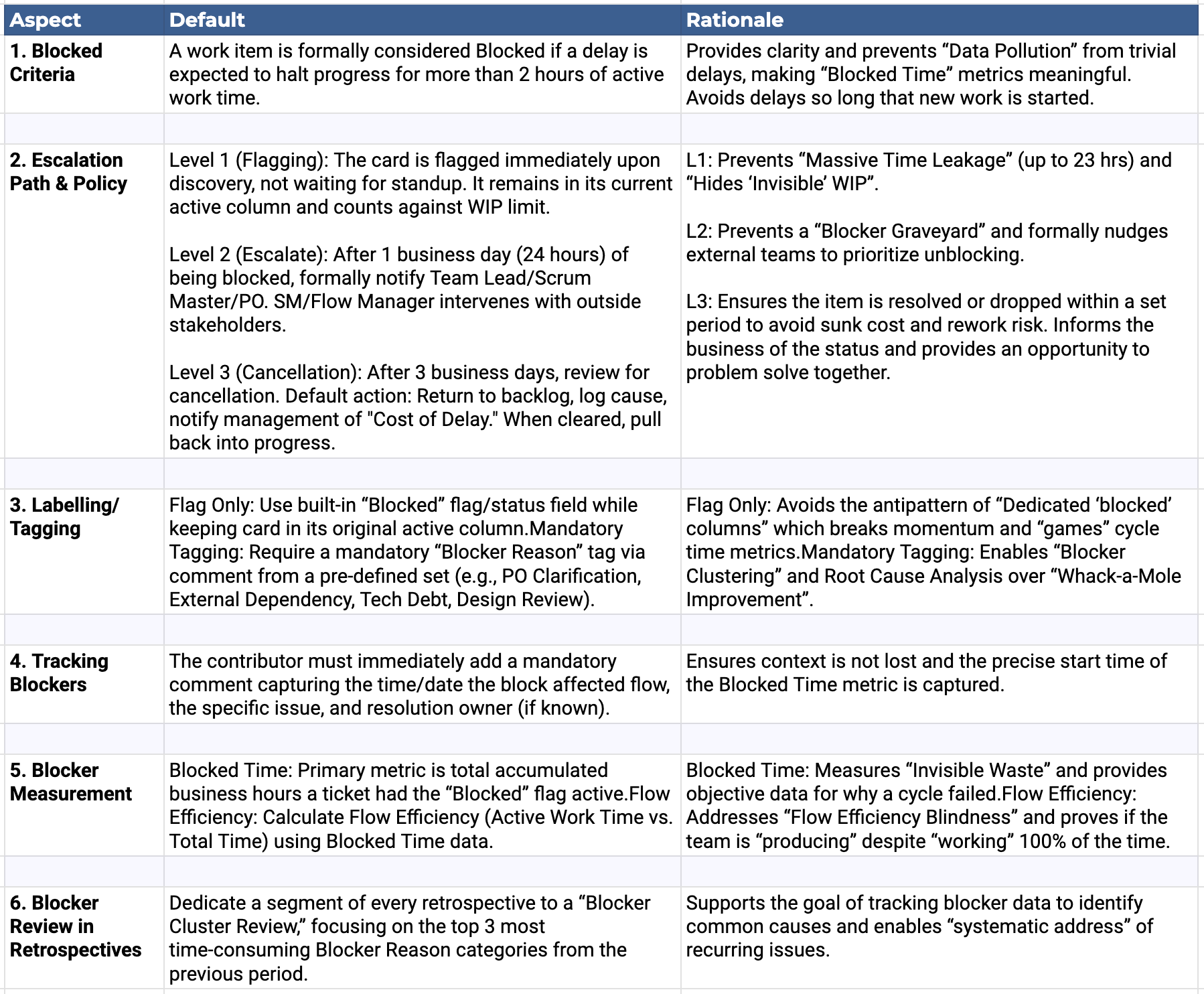
Suggested Additional Policies and Practices
Immediate Swarming: When a “Blocked” flag is raised, the team must treat it as a “flare”. Team members pause secondary tasks (e.g., minor refactoring, documentation) to check if they can immediately swarm and help clear the path, reinforcing the “Stop the Line” (Andon) culture essential to Lean.
Active Definition of Ready (DoR) Enforcement: Strengthen the Definition of Ready to explicitly prohibit starting work (pulling a card into a WIP-limited column) if a known external dependency or required information is outstanding. This prevents “Lazy Refinement” and ensures the card is ready to flow.
Impediments and Blockers to track
Slow Infrastructure: Dealing with sluggish build pipelines or unoptimized development environments.
Testing Bottlenecks: Being stalled by a prolonged or inefficient testing phase.
Technical Debt: Struggling to navigate and build upon a messy or outdated codebase.
Missing Stakeholders: Lacking the necessary decision-makers or subject matter experts in critical conversations.
Cross-Team Dependencies: Relying on external groups to deliver their work before your team can proceed.
Individual Bottlenecks: Being forced to context-switch and start new tickets simply because you are waiting on a specific dependency.
Meeting Overload: Having your calendar filled with meetings, leaving no uninterrupted time for focused execution.
Practical Example
Here is a step-by-step linear walkthrough of how a team might apply the rules and policies you’ve outlined for managing blockers on a Kanban board, with a practical example:
Scenario
Your team is working on a Kanban board with a work item currently in the “Development” column. However, progress is halted because of a delay in getting the required API key from an external vendor. The team follows the policies outlined above to manage this blocker effectively.
Step 1: Identifying the Blocker (Level One - Blocking Criteria)
Policy in action: After 2 hours without progress on the work item, the developer working on the task identifies that they cannot continue without an API key for an external service. According to the Blocking Criteria policy, the developer tags the work item with ‘Add flag’ to indicate that it’s blocked, and comments the details.
Effect: The developer logs the block which collects data on the condition, creates a visual queue, and maintains the integrity of the flow metrics.
Step 2: Recording the Blocker Context (Block Tracking Policy)
Policy in action: The work item remains in the “Development” column but is flagged. The developer adds a note explaining (via Flag with comment) that the blocker is due to an external dependency (waiting for the API key from an external vendor). The type of blocker (external) and the root cause (waiting for API key) are documented.
Effect: The Kanban card now shows its blocked status with a note: “Blocked due to API key delay (external blocker).” This ensures visibility and accountability, and the blocker remains within the workflow, preserving the flow metrics.
Step 3: WIP Limits and Time-Based Review (Level Two - WIP Limits and Ageing Items)
Policy in action: The blocked work item continues to count against the team’s WIP limit to reflect its impact on the system. It still needs to be managed, and should remain in active context. After three days, the work item is still blocked. During the next stand-up, the team reviews the blocker and escalates it to higher level leadership for further attention.
Effect: WIP doesn’t expand so capacity doesn’t become overloaded, and the developer pursues escalation to make progress, preventing a stall or unnecessary delay.
Step 4: Blocker Clustering (Actionable Blocker Policy)
Policy in action: The same blocker occurs multiple times over a few weeks (e.g., waiting for API keys or similar external dependencies). During the retrospective, the team clusters these recurring external blockers. It discusses ways to manage external dependencies more effectively, e.g., setting up earlier API requests or creating a vendor management process.
Effect: The retrospective reveals that delays in receiving external API keys have blocked several work items in the past. As a result, the team decided to build earlier communication with vendors as part of their planning.
Step 5: Escalation or Cancellation (Level Three - Blocker Cancellation and Restart)
Policy in action: The work item is still blocked after seven days. The team holds a review and decides whether to cancel the work item (if it no longer has value) or deprioritize it until the external issue is resolved. In this case, they decide to keep it on hold and escalate the problem to senior management to intervene with the vendor.
Effect: The team moves the work item to the backlog, documenting that it will be revisited once the API key issue is resolved. They ensure that any lessons learned (e.g., the need for better external dependency management) are incorporated into their workflow.
Step 6: Systemic Process Improvement (Blocker Clustering)
Policy in action: The team identifies a recurring pattern with external blockers through blocker clustering and regular reviews. They propose a systemic improvement, such as setting up vendor agreements requiring API keys to be delivered at least two weeks before the work item is expected to be developed.
Effect: In the future, this process improvement will reduce the frequency of similar external blockers and improve the overall flow of work.
How do you handle blocks?
With clear policies, a team can ensure that blockers are visible, escalated, and resolved efficiently. They can improve their process through regular retrospective discussions and blocker clustering, addressing blockers systematically. The system evolves to reduce similar blockers in the future, enhancing flow and predictability.
Hope this is helpful for you! I’d love to hear what you’d add or change to fit your needs

Reference
https://www.prokanban.org/blog/whats-wrong-with-having-a-blocked-column
https://www.prokanban.org/blog/do-you-treat-internal-vs-external-blockers-differently
https://www.prokanban.org/blog/automating-the-impact-of-blocked-work-in-jira
https://www.thoughtworks.com/en-ca/insights/articles/how-to-tame-evil-dependencies
JQL example to find blocked issues
project = “[TODO]” AND labels in (TODO) AND statusCategory = “In Progress” AND (Flagged is not EMPTY OR issueFunction in linkedIssuesOf(”resolution = unresolved”, “is blocked by”)) ORDER BY updated DESC
Excellent playbook, Steve. I appreciate you sharing it.
At my last organization, "aged work" became one of my favorite metrics, introduced later, because it exposed where blockers clustered and which parts of the system repeatedly caused delays. Our visibility platform ingested blocker data and exposed impact and comments from Jira, but using the Jira flag (we didn’t think of this at the time; rather than using labels) is a practical way to preserve that insight without relying on another platform.
The biggest takeaway for me is the explicit blocker policy. Teams knew blockers required attention, but we had not defined clear escalation paths or response expectations. That turns the signal into action. I will adopt this suggestion.
One question: when a blocked item is deprioritized and returned to the backlog, how do you preserve its full cycle-time story? I have generally favored keeping the clock running from original commitment to completion because that reflects the true elapsed cost, even when work is paused or restarted.
Thanks for the post and playbook!
Thanks Steve for the comment - really useful playbook 🙏